
Smart Shade Hub Integration Explained for 2026
TL;DR:
- Smart shade hub integration connects motorized window shades to home automation networks using wireless protocols. Matter-over-Thread will become the standard in 2026, enabling native multi-platform compatibility without bridges. Using a hub for Zigbee or Thread ensures reliable, local operation and simplifies troubleshooting.
Smart shade hub integration is the process of connecting motorized window shades to your home’s automation ecosystem through a compatible wireless protocol and, in most cases, a central hub device. The result is a smart home shade system where your shades respond to voice commands, schedules, sensors, and geofencing without any manual input. The Matter-over-Thread protocol is the 2026 gold standard for this type of integration, enabling direct connection to Apple Home, Amazon Alexa, and Google Home without brand-specific bridges. Getting this right means choosing the correct protocol for your home size, pairing it with the right hub, and following a clear setup process.
What wireless protocols power smart shade hub integration?
The protocol your shades use determines how they talk to your home network, which hub they need, and how reliably they respond. Three protocols dominate the market: Wi-Fi, Zigbee, and Thread/Matter.
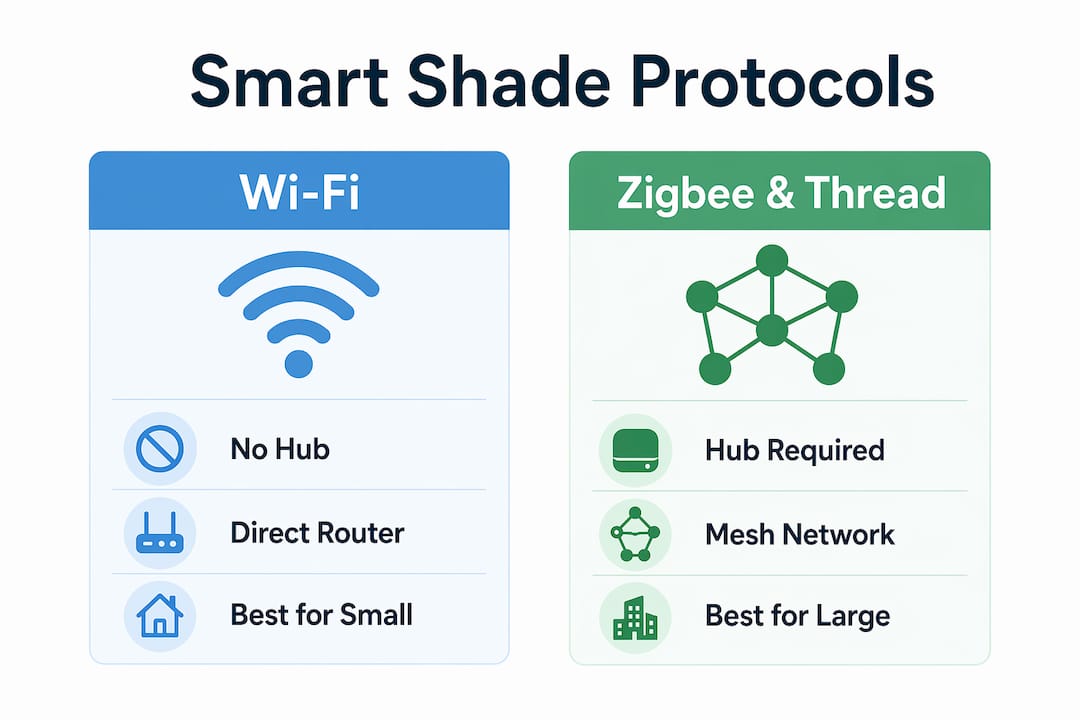
Wi-Fi is the simplest entry point. Shades connect directly to your router with no hub required. The tradeoff is real: Wi-Fi adds network traffic, and running multiple motorized shades simultaneously can cause command latency or dropped signals. Wi-Fi works well for one or two shades but struggles in larger installations.
Zigbee uses low-power mesh networking. Each shade acts as a signal repeater, so the more shades you add, the stronger your network becomes. Zigbee requires a hub, such as a HomePod mini or a SmartThings station, to bridge the Zigbee mesh to your home’s Wi-Fi network. The payoff is whole-home reliability that Wi-Fi alone cannot match.
Thread/Matter is the protocol combination reshaping automated shade control in 2026. Thread is the low-power mesh layer. Matter is the application standard that runs on top of it. Together, Matter-over-Thread enables native certification across all major platforms simultaneously, so one set of shades works with Apple Home, Alexa, and Google Home without separate bridges or account linking.
| Protocol | Hub required | Reliability | Best for |
|---|---|---|---|
| Wi-Fi | No | Moderate | 1–3 shades, simple setups |
| Zigbee | Yes | High | Whole-home installations |
| Thread/Matter | Border router | Very high | Multi-platform, future-proof setups |
Pro Tip: If you are buying motorized shades today, prioritize Matter certification. It protects your investment as ecosystems evolve and eliminates the need to re-purchase hardware when you switch platforms.
How do smart shade hubs function and why do they matter?
A smart shade hub is a dedicated device that translates signals between your phone, voice assistant, or automation controller and your motorized shades. Without a hub, most shade protocols cannot communicate with your home’s Wi-Fi network or cloud services.
The core functions of a hub include:
- Signal translation: Converts Zigbee or Thread signals into commands your router and cloud services understand.
- Local processing: Hubs process commands locally, which reduces latency and keeps shades responsive even when your internet connection drops.
- Mesh coordination: The hub manages the mesh network, routing commands to every shade in the home efficiently.
- Automation scheduling: Most hubs store schedules on-device, so sunrise and sunset routines run without cloud dependency.
- Security management: Hubs act as the single point of access control for all connected shades.
Security deserves more attention than most homeowners give it. Security professionals recommend placing smart shade hubs behind secure firewalls and keeping firmware updated consistently. An outdated hub is an open door for IoT vulnerabilities. Treat your shade hub the same way you treat your router: update it, secure it, and place it on a dedicated IoT network segment if your router supports VLANs.
Pro Tip: Place your hub as close to the center of your home as possible. For Zigbee and Thread meshes, central placement reduces the number of hops a signal takes, which directly improves response speed.
How do you integrate smart shades with Apple Home, Alexa, and Google Home?
Each major platform has its own setup path. Knowing the exact steps for each one saves hours of troubleshooting.
Apple HomeKit setup
- Confirm your shades carry the HomeKit certification label. Non-certified shades require a separate bridge device.
- Open the Apple Home app and tap the “+” icon to add an accessory.
- Scan the device’s QR code printed on the shade motor or packaging. The Home app handles the rest automatically.
- Assign the shade to a room and name it clearly (for example, “Living Room Left”).
- Create automations using Siri, time-based triggers, or the Home app’s scene builder.
HomeKit-certified shades communicate locally through a HomePod mini or Apple TV acting as a home hub. This means Siri commands execute in milliseconds, not seconds.
Amazon Alexa setup
- Open the Alexa app and navigate to “Skills & Games.”
- Search for your shade manufacturer’s skill and enable it.
- Sign in with your proprietary app credentials to link the accounts.
- Tap “Discover Devices” to let Alexa find your shades automatically.
- Group shades by room in the Alexa app for multi-shade voice commands.
Once linked, shades appear as controllable devices in the Alexa app and respond to voice commands like “Alexa, lower the bedroom shades.”
Google Home setup
- Open the Google Home app and tap “+” to add a device.
- Select “Works with Google” and search for your shade brand.
- Link your manufacturer account to authorize Google Home access.
- Assign shades to rooms and create routines.
- Enable geofencing so shades adjust automatically when you leave or arrive home.
Matter-enabled shades skip the account-linking step entirely. They appear natively in Google Home the same way a Nest device does, which removes a common point of setup failure.
What troubleshooting steps fix common smart shade hub problems?
Most smart shade hub problems fall into three categories: connectivity failures, response delays, and sync errors between the app and the physical shade position.
- Device showing offline: Check hub power and Wi-Fi connection first. Then verify the shade motor has battery charge or power. Restart the hub before re-pairing the shade.
- Wi-Fi interference: Wi-Fi interference and hub placement are the top causes of latency and offline errors. Move the hub away from microwaves, cordless phones, and thick concrete walls.
- Weak Zigbee or Thread mesh: Add a device between the hub and the farthest shade. Each additional Zigbee or Thread device extends the mesh range, so a shade in a distant room often fixes itself once a closer device is added.
- App and shade position out of sync: Manually move the shade to its fully open or fully closed position, then use the app’s calibration function to reset the motor’s travel limits.
- Slow response times: Confirm hub firmware is current. Keeping devices up to date resolves the majority of latency issues that appear after platform updates.
- Shades stop working during internet outages: Switch to a Zigbee or Thread protocol. Zigbee and Thread shades operate locally, so they continue working when the internet drops, unlike most Wi-Fi-only shades.
For persistent issues, a factory reset of the shade motor followed by a fresh pairing resolves problems that firmware updates cannot. Document your shade names and room assignments before resetting so you can rebuild the configuration quickly.
Key Takeaways
Smart shade hub integration works best when you match the wireless protocol to your home size, choose Matter-certified hardware, and keep hub firmware current.
| Point | Details |
|---|---|
| Protocol choice matters | Wi-Fi suits small setups; Zigbee and Thread/Matter deliver whole-home reliability. |
| Matter is the 2026 standard | Matter-certified shades work natively with Apple Home, Alexa, and Google Home without extra bridges. |
| Hubs process commands locally | Local processing keeps shades responsive even when your internet connection goes down. |
| Security requires active maintenance | Update hub firmware regularly and place the hub on a secure network segment. |
| Troubleshooting starts with placement | Most offline and latency errors resolve by repositioning the hub or adding a mesh device. |
Why I always recommend starting with protocol, not product
Most homeowners I talk to start their smart shade search by picking a brand they recognize. That is the wrong starting point. The protocol your shades use will determine every integration decision you make for the next decade. I have seen well-funded smart home setups become expensive headaches because the homeowner chose a proprietary Wi-Fi shade system that locked them into a single app with no path to Apple Home or Google Home.
My recommendation is to read the smart home shading guide before you buy anything. Understand whether your home needs a hub-based mesh system or whether a direct Wi-Fi connection is sufficient for your shade count. For homes with more than four motorized shades, Zigbee or Thread is almost always the better choice.
The security angle is one I feel strongly about. Treating your shade hub as a critical IoT device, not a peripheral accessory, changes how you configure your network. Placing it behind a firewall and on a dedicated IoT VLAN is not paranoia. It is the same logic that applies to any device with persistent internet access in your home.
Matter-over-Thread is genuinely exciting because it ends the era of proprietary lock-in. A shade you buy today with Matter certification will work with whatever platform you adopt in five years. That kind of forward compatibility is rare in consumer electronics, and it is worth paying a small premium for. Check the practical guide to integrating shades if you want a room-by-room approach to planning your setup.
— Sunny
Valueblindsdirect motorized shades built for smart home setups
Valueblindsdirect offers a full range of motorized and smart shades designed to work with the protocols and platforms covered in this article. Every motorized option ships with compatibility details for major ecosystems, so you know exactly what hub or border router you need before the shades arrive.
The Window Treatment Design Studio lets you configure shades by room, fabric, and motorization type before you order. If you want expert guidance on motor calibration and hub placement, Valueblindsdirect’s installation support team walks you through every step. From cellular shades to zebra shades with smart control, the catalog covers every window type in a modern home.
FAQ
What is smart shade hub integration?
Smart shade hub integration is the process of connecting motorized window shades to a home automation ecosystem through a wireless protocol and a central hub device. The hub translates signals between your shades and platforms like Apple Home, Alexa, or Google Home.
Do I need a hub for smart shades?
Wi-Fi shades connect directly to your router without a hub, but Zigbee and Thread shades require a hub or border router to bridge the mesh network to your home’s Wi-Fi. Matter-certified shades need only a Thread border router, which many smart speakers already include.
What is the best protocol for integrating smart shades in 2026?
Matter-over-Thread is the best protocol for new installations in 2026. It delivers native compatibility with all major platforms, local processing reliability, and mesh network range without requiring brand-specific hubs.
Why do my smart shades go offline?
Offline errors most often result from Wi-Fi interference, low motor battery, or an outdated hub firmware version. Repositioning the hub, charging the motor, and running a firmware update resolves the majority of offline issues.
Can smart shades work without an internet connection?
Zigbee and Thread shades process commands locally and continue working during internet outages. Wi-Fi-only shades typically lose functionality when the internet drops because they depend on cloud-based command routing.